Businesses in ChatGPT: what it is and how to claim your business
OpenAI now lets a business claim how it shows up in ChatGPT. Here's what that means for a service business and what it doesn't do. Plus five things to do this week.
 The ManageBee team8 min read
On this page
What is Businesses in ChatGPT?
Businesses in ChatGPT is an OpenAI beta that lets a business claim its profile in ChatGPT. You can keep the details ChatGPT shows about you up to date, and see how often you come up in answers. It launched November 10, 2026, and it's free for now. Think of it as a Google Business Profile, but for AI.
It matters because people already ask ChatGPT things like "who's a good plumber near me" or "which home inspection company should I trust before I buy?" OpenAI says ChatGPT reaches about 1.2 billion people a week. Until now, a business had no say in how it showed up in those answers. Businesses in ChatGPT has three parts:
- Business Hub is where you claim your business and manage what ChatGPT shows about it.
- Insights, inside Business Hub, shows how often you come up and what people were asking about.
- Business Agents let a customer chat with an AI assistant that answers for your business, right inside ChatGPT. For now, only U.S. online stores and online service businesses can use them.
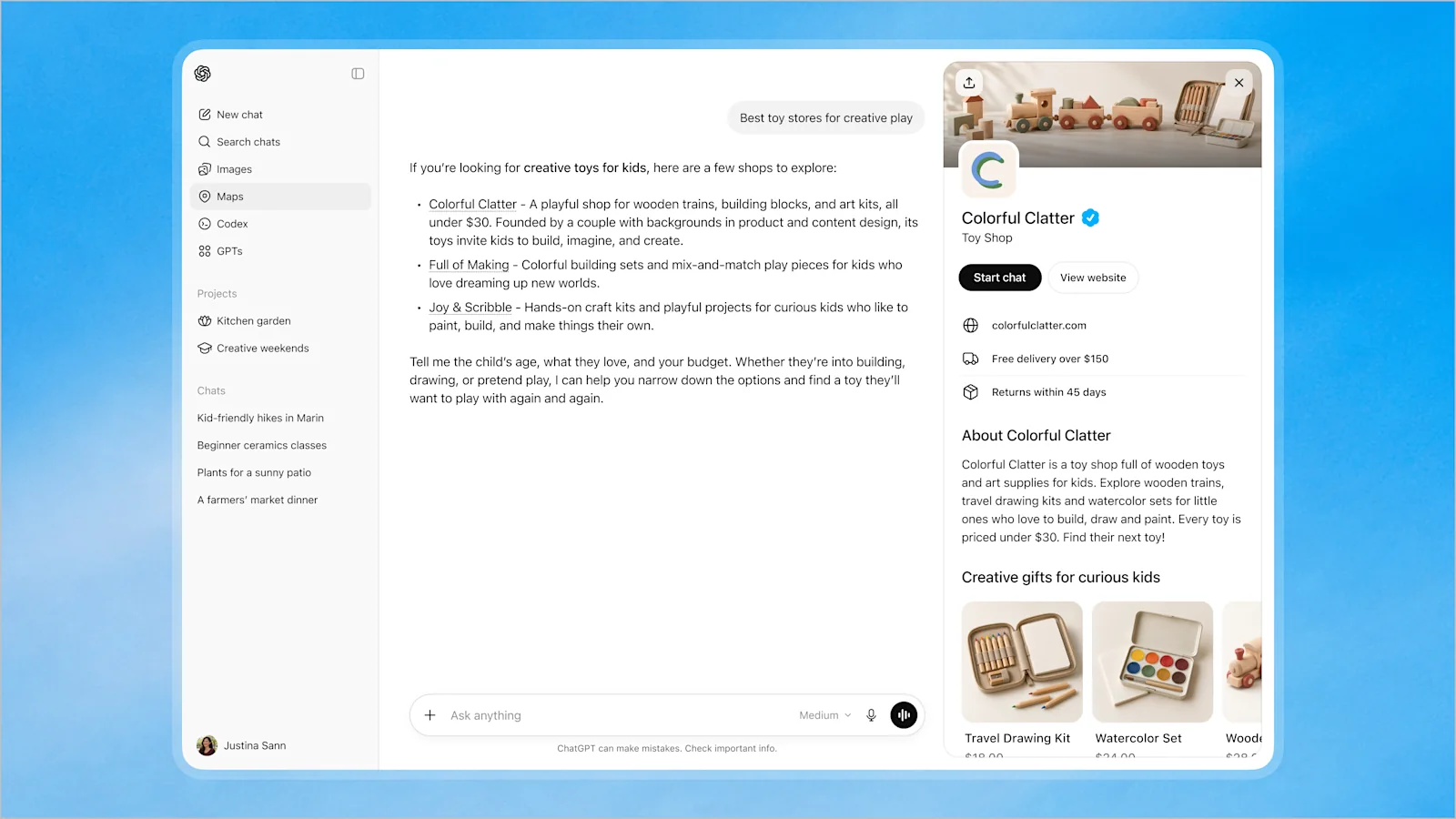
The picture at the top of this page shows a claimed profile, opened from an answer. There are also product feeds for online stores, and sponsored placements (ads). Most service businesses can skip both for now.
Is Businesses in ChatGPT the same as ChatGPT Business?
No. ChatGPT Business is OpenAI's paid plan for teams that use ChatGPT at work (it used to be called ChatGPT Team). Businesses in ChatGPT is about how your business shows up when customers use ChatGPT. If you searched "ChatGPT for Business," here's the difference:
| Question | Businesses in ChatGPT | ChatGPT Business |
|---|---|---|
| What it is | Your business's profile in ChatGPT's answers | A plan for your team to use ChatGPT at work |
| Who sees it | Your customers, when they ask ChatGPT | Your team |
| Cost | Free during the beta | Paid, per person |
| Where you manage it | Business Hub | Your workspace's admin settings |
The rest of this guide is about Businesses in ChatGPT.
Why does it matter for a service business?
Because ChatGPT answers with a few names, not a page of links. When someone searches Google, they get a page of links and a map of Google Business Profiles to scroll. When they ask ChatGPT, they usually get a short answer with two or three businesses in it. If you're not one of those names, that customer may never see you. Businesses in ChatGPT is your Google Business Profile for that answer.
And if you are named, your details have to be right. An old phone number, an area you stopped serving or hours from two years ago will cost you the call. That matters most for a local business. A person with a broken AC at 4 PM, or a car that won't start, is ready to book today.
What can you do in Business Hub?
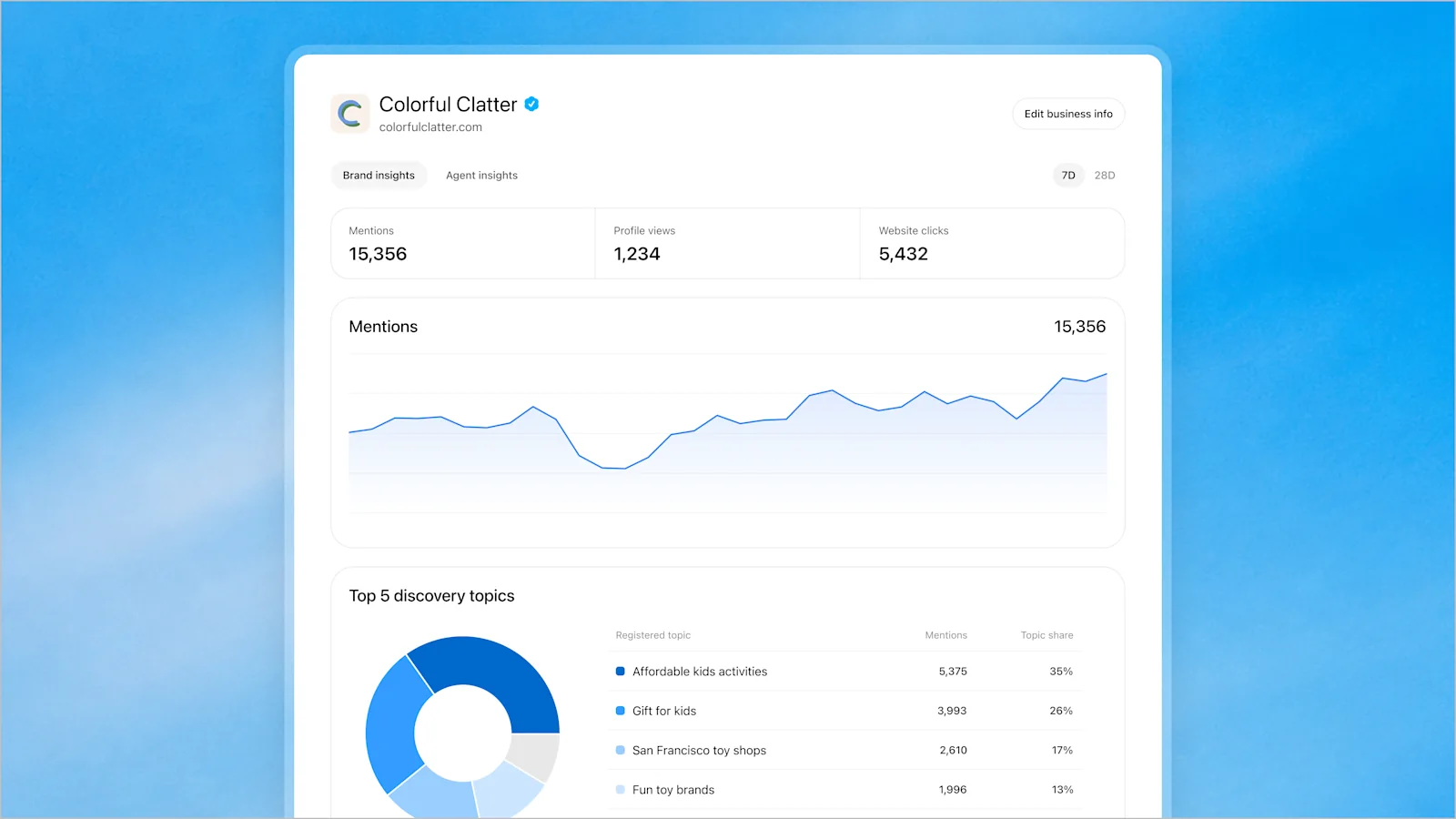
In Business Hub you can update the details on your ChatGPT profile. You can also see Insights, which show how often you come up. Once you've claimed your business, you can:
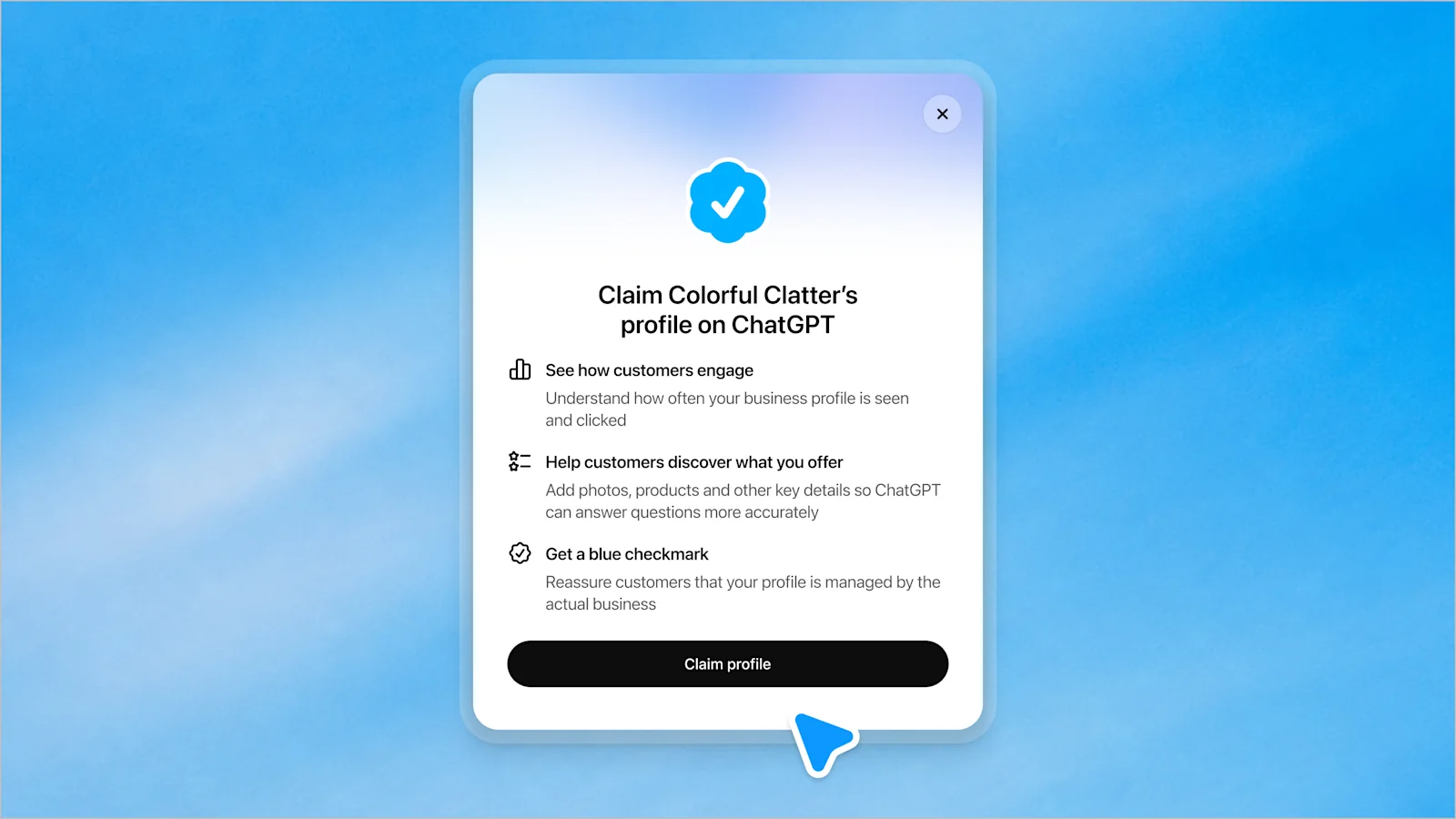
- Update your details. Add what you offer and other key details, so ChatGPT can answer questions about you more accurately. Keep your website and description up to date. The blue checkmark shows once your ID check is approved.
- See your Insights for the last 7 or 28 days:
- Mentions
- For a local business, a mention counts when ChatGPT shows you as a result for your area. Your name coming up in passing doesn't count.
- Profile views
- How often people opened your profile from an answer.
- Website clicks
- Clicks on links to your website from ChatGPT.
- Discovery topics
- The common themes of chats where ChatGPT pointed to your website. For example, "emergency AC repair" or "kids' haircuts."
Three things to know before you read those numbers:
- You won't see anyone's conversation. Insights shows totals and topics only.
- Small numbers may not show at all until there are enough conversations to report.
- A click isn't a visit. OpenAI says clicks "don't confirm website visits or conversions," so don't expect them to match your own website stats.
What doesn't Businesses in ChatGPT do?
It doesn't move you up in answers, it doesn't promise your details are right, and its Business Agents aren't open to most local businesses yet. In more detail:
It won't rank you higher. OpenAI says claiming doesn't change how often a business appears. ChatGPT still decides on its own who to recommend. Claiming is about getting your details right, not buying a spot.
It doesn't guarantee your profile is correct. OpenAI says it doesn't check every detail. A profile can also include information from other sources. That's why your website and other listings still need to be right (more on that below).
Business Agents aren't for most local businesses yet. At launch, agents are open to eligible ecommerce and online service businesses in the United States. OpenAI hasn't said whether a local plumber, salon or inspector counts. Agents also have rules: they must say they're an AI, they can't make up prices or availability, and they can't give advice that legally needs a professional license. If you're licensed, like an electrician, an accountant or an inspector, expect that last rule to matter.
It's free for now. OpenAI told reporters there's no charge during the beta but didn't rule out charging later. Ads are a separate, paid product, and OpenAI says sponsored placements are labeled and kept apart from ChatGPT's answers.
How do you claim your business in ChatGPT?
You claim it in Business Hub. Find your business, prove you run it, pass an ID check, then fill in and check your details. At launch you need a website. A local business can also only claim a listing ChatGPT already has, in the U.S. Here are the steps as of launch:
Open Business Hub and find your business.
Business Hub is in the ChatGPT sidebar, or at chatgpt.com/business-hub. A local business, like a plumber, a salon or a store, can only claim a listing ChatGPT already has. For now, that listing has to be in the U.S.
Verify that you run the business.
OpenAI's help article lists four ways to prove it. You can have a code sent to your business phone or to your business email. You can add a TXT record to your website's domain (how to add one is below). Or you can connect a Shopify store. You may not see all four, so use one that Business Hub offers. OpenAI then reviews your claim.
Pass the ID check.
Next comes a separate identity check through Persona, which OpenAI uses to confirm who you are. Until it's approved, you can't publish changes or see Insights, and the blue checkmark won't show. Have a government ID ready, and make sure your legal business name and address match your official records. Once it's approved your profile goes live, and a published profile can't be deleted, so get the details right first.
Fill in your details and check them.
Add what you offer, your website, your description and anything else it asks for. Then read it over the way a customer would. OpenAI reviews your edits before they go live.
How do you add a TXT record to verify your domain?
You add the line of text Business Hub gives you as a new TXT record in your domain's DNS settings. That's how you prove a domain like yourbusiness.com is yours. You'll find DNS settings wherever you bought your domain, or sometimes at your website host. Follow what Business Hub shows you; in general it goes like this:
Copy the record Business Hub gives you.
It's usually a long string of letters and numbers. Copy it exactly, with nothing added. If Business Hub also gives you a host name, write that down too.
Sign in where you bought your domain.
Look for the DNS settings. They may be called DNS records, Manage DNS or Advanced DNS. If someone else built your website, they may handle this for you. Send them the value and ask them to add it.
Add a new TXT record.
Set the type to TXT. For the host (sometimes called the name), use what Business Hub says. If it doesn't say, @ usually means your main domain, like yourbusiness.com. Paste the value. Leave the TTL at its default setting.
Save it, then go back to Business Hub and select Verify domain.
DNS changes often show up within minutes, but they can take up to a day or two. If it doesn't verify, wait an hour and try again.
A TXT record doesn't change your website or your email. Leave it in place after you're verified.
Larger companies that already work with OpenAI, as Enterprise customers or advertisers, can go through their OpenAI contact instead. This is a beta, so expect the steps to change. Check OpenAI's announcement for the latest version.
What should a service business do this week?
Check what ChatGPT says about you, fix your website, and make your details match everywhere. Then claim your profile if you can, and make booking easy. None of these wait on OpenAI. They work whether or not you can claim a profile yet:
Ask ChatGPT about yourself.
Try "Who's the best [your kind of business] in [your town]?" and "What do you know about [your business name]?" Write down anything that's missing or wrong. That's your to-do list.
Fix your website first.
Put the plain facts on the page in words. List the services you offer, the area you serve, your hours, your phone number and any license numbers. AI tools read text. A list of services inside a picture doesn't count. No website yet? We build them for service businesses.
Make your details match everywhere.
Use the same business name, phone number and address everywhere. That means your website, your Google Business Profile and other map listings, review sites and social pages. When the web disagrees about you, AI answers can too.
Claim your profile if you can.
If your business qualifies, claim it and check every detail. Then set a reminder to look at your Insights once a month.
Make it easy to book once they click.
A click from ChatGPT is worth nothing if people land on a contact form and wait three days. Let people pick a time and book online, and answer the phone when it rings.
Is it worth claiming your business in ChatGPT?
Yes, if your business qualifies. It's free during the beta, and it keeps what ChatGPT says about you accurate. Just don't expect it to move you up. It doesn't buy you a spot.
It's also a chance to get ahead. This is brand new, and most of your competitors haven't claimed their profile yet. Claiming won't move you up the list on its own, but when ChatGPT does name you, a complete profile with the blue checkmark stands out next to businesses that never claimed theirs. Early adopters also start learning what customers ask while everyone else is still catching up.
ChatGPT is turning into one more place customers find a local business, next to Google and maps.
The businesses that show up will be the ones that do the basics well. That means a clear website that says what you do and where, the same details everywhere, and an easy way to book. Those were worth doing before AI answers. They're worth even more now.
Frequently asked questions
What is Businesses in ChatGPT?
It's a beta from OpenAI, launched November 10, 2026, that lets a business claim its profile in ChatGPT, update the details ChatGPT shows, and see how often it comes up in conversations. It has three parts: Business Hub, Insights and Business Agents.
Is it free to claim my business in ChatGPT?
At launch, yes. OpenAI told reporters it's free for now but didn't rule out charging later. Sponsored placements (ads) are a separate, paid product.
How do I verify my service business in ChatGPT?
A service business verifies the same way as any other, in two steps. First, prove you run the business. You can use a code sent to your business phone or business email, a TXT record added to your website's domain, or a connected Shopify store. Then pass a separate identity check through Persona. Until it's approved, you can't publish changes or see Insights, and the blue checkmark won't show.
Is Businesses in ChatGPT like a Google Business Profile?
Yes, it's the closest thing to a Google Business Profile for AI. You claim your listing, keep your details up to date and see how often people find you. The difference is that ChatGPT answers with a few names instead of a map full of results.
Can a local service business claim its profile in ChatGPT?
Yes, if ChatGPT already has a listing for it and it's in the U.S. At launch, local businesses can claim an existing U.S. listing but can't create a new one. OpenAI hasn't published a list of countries.
Will claiming my business make ChatGPT recommend me more?
No. OpenAI says claiming a profile doesn't change how often a business appears. ChatGPT still decides on its own who to recommend. What claiming gives you is correct details and a view of how often you come up.
Can a local service business, like a plumber, salon or auto shop, use Business Agents?
OpenAI hasn't said yet. At launch, Business Agents are open to eligible online stores and online service businesses in the United States. OpenAI hasn't said whether local businesses count. Agents also can't give advice that legally needs a professional license.
Can I claim my business in ChatGPT without a website?
Not at launch. OpenAI requires a website to claim a profile. Start with a simple site that lists your services, the area you serve, your hours and your phone number. That's also what ChatGPT reads when it answers questions about you.
Is Businesses in ChatGPT the same as ChatGPT Business?
No. ChatGPT Business is OpenAI's paid workspace plan for teams that use ChatGPT at work (it used to be called ChatGPT Team). Businesses in ChatGPT is about how your business shows up when customers use ChatGPT.
Can I see what customers asked ChatGPT about my business?
No. Insights shows totals and common topics, not anyone's conversation. Small numbers may be held back until there are enough conversations to report.
Sources
- OpenAI: Introducing Businesses in ChatGPT
- OpenAI Help Center: Setting up your business on ChatGPT
- The Rundown: How to claim and set up your business on ChatGPT
- Relevant Audience: Businesses in ChatGPT, Business Hub and Business Agents (with Digiday's and Search Engine Roundtable's reporting)
- Unite.AI: OpenAI launches Business Hub and Business Agents in ChatGPT
- Inside AI News: OpenAI launches Businesses in ChatGPT beta
Last checked November 11, 2026, the day after launch. Businesses in ChatGPT is a beta, so details may change.